Review Comments (0) Screenshots (4) Questions & Answers (0) Votes (2) Awards (6) Wiki  
(2)
Tinnes Software
6.2
tinnes.org.uk
Freeware
499 people
Download Timed Shutdown

667.83 KBDownloaded 1348 times

This software was checked for viruses 4 months ago and was found to contain no viruses.
Click here to see antivirus report.
 
Video tutorial for Timed Shutdown 6.2
Frame

Review

This is official description

This prolongs its lifespan and saves power. The triggers include Time and Date, CPU or Network usage, on Application Close and even Sound Level. The program hides in the system tray when running so can be easily monitored and aborted if needed, and uses a final countdown to eliminate unexpected shutdowns. You can also run the program with a command line for use at the end of a batch file, or from a shortcut with predefined settings.
 
The following review written by one of the Software Informer contributors applies to version 1.0

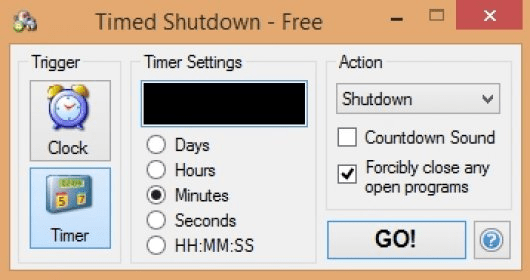
If you have an ATX computer (which most now are) you can use this program to automatically shutdown your computer. This can be useful if you are setting your computer to do something when you are not there e.g. Upoloads, downloads, Encoding, etc. You can configure the program to turn your computer with 4 triggers.

Timed Shutdown helps you to automatically shutdown, restart, log off, disconnect or hibernate your computer. There are four triggers that can be used: at a certain time of the day, after a countdown, when the CPU usage goes down certain limit or when your computers get disconnected from the internet.

Your computer doesn't have to be ON more time than necessary. When running, the program goes to the system tray so it can be easily aborted. Moreover, it gives you the option of a 5-60 second countdown. You can also configure the program from the command line; for instance, if you usually use the same settings.

Force the status of your computer at a certain time, after a countdown, when the CPU usage goes down or when you get disconnected from the internet. It also gives the option of a 5 second countdown, again in case you change your mind. You can also shutdown without a trigger if you add a switch in the command line. This shuts down as soon as it is run and can be used at the end of a batch file.
  • Allows your computer to do unattended jobs
  • None

Reviewed by: Sergio A. Durán

Reviewer rating:

Reviewed: 3 years ago

Report a wrong version Report a wrong program title Suggest a correction

Screenshots

main view main view Countdown option, How many minutes/hours/days/ you want to keep on your computer? Countdown option, How many... Schedule when to shutdown your computer by CPU usage Schedule when to shutdown... What time do you want to shutdown your computer? What time do you want to...

Latest comments


There are no comments, be the first one!
Add new comment

E-mail Address:

Password:

Register now »

Forgot password?

Sign in with:
Download Software Informer Client
Copyright © 2012, Informer Technologies, Inc. About| Privacy and terms| Help| Feedback & Support| Partners program